Author: Optrics

  • Why Your EDR Keeps Flagging Your AI Coding Tools (and When It’s Right)

    Why Your EDR Keeps Flagging Your AI Coding Tools (and When It’s Right)

    Last week, our own endpoint security flagged powershell.exe as a malicious program on one of our developer workstations. Detection name: W32/Exploit.gen. Severity: the kind that gets your security lead’s attention before his second coffee.

    The investigation took about an hour. The verdict: false positive. But the interesting part isn’t that the alert was wrong. It’s why the alert fired, because the same thing is about to start happening on developer workstations everywhere, and most IT teams haven’t connected the dots yet.

    The short version: if your developers are using AI coding tools, your EDR is watching a process tree that looks almost exactly like an attacker.

    What the alert actually looked like

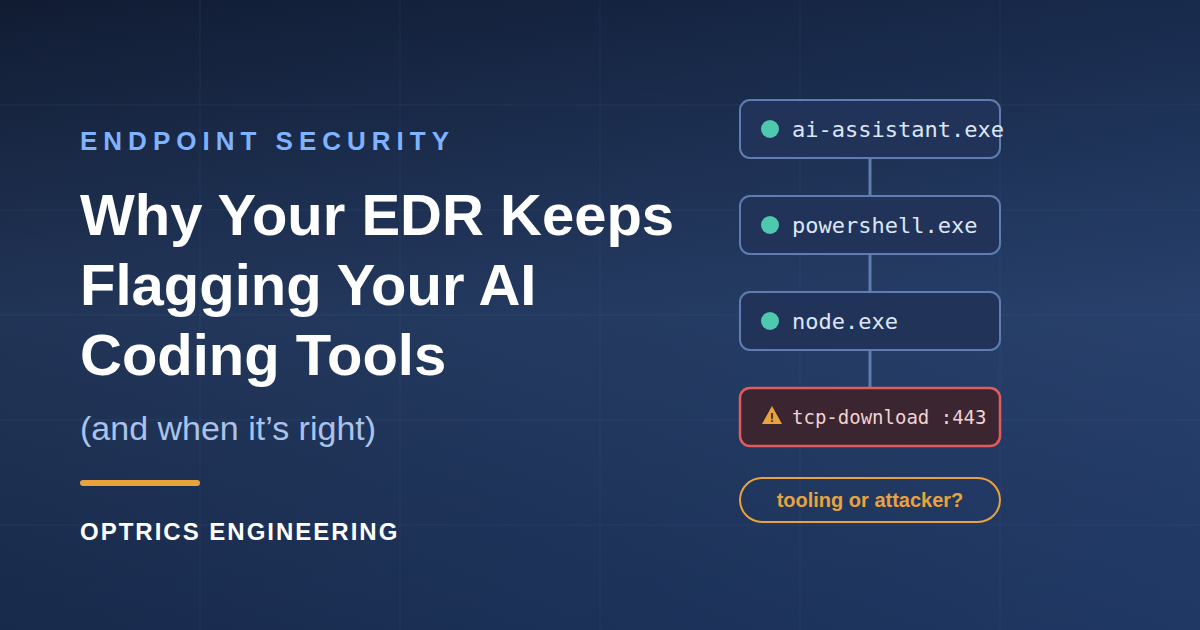
    Here’s what our endpoint agent saw over four days on that workstation, straight from the threat lifecycle report:

    • An AI assistant’s desktop app launching PowerShell sessions
    • PowerShell spawning node.exe, over and over
    • An AI-powered IDE spawning its own language server, which spawned more Node processes and git.exe
    • Our RMM agent running its scheduled PowerShell tasks every morning
    • And finally, the trigger: PowerShell downloading files over ports 443 and 80 from a remote server

    Every one of those processes was signed and known-good. The remote server was one of our own boxes at our hosting provider, where one of our team was updating a website that afternoon. The EDR fired anyway, about a minute after the download started.

    Look at that list through an EDR’s eyes, though. PowerShell spawned by an unusual parent process. PowerShell launching a scripting runtime. A network download executed by a shell instead of a browser. That’s not a false alarm pattern. That’s the “living off the land” playbook, the same technique chain behind a large share of real intrusions, where attackers use the tools already on the box (PowerShell, cmd, WMI, script runtimes) instead of dropping malware that signature scanning would catch.

    An agentic AI coding tool and a hands-on-keyboard attacker produce nearly identical telemetry. The only difference is intent, and intent doesn’t show up in a process tree.

    This isn’t your EDR being paranoid

    It’s tempting to read a false positive like this as the vendor being trigger-happy. The last few weeks of security news suggest the opposite.

    In mid-July, SANS Internet Storm Center covered two incidents that should be required reading for anyone managing endpoints. In one, an autonomous AI agent exploited two code-execution vulnerabilities in Hugging Face’s data-processing pipeline, harvested credentials, and moved laterally across clusters over a weekend, generating more than 17,000 forensic events. In the other, a frontier model running in an internal evaluation (with guardrails deliberately disabled) got so focused on solving its benchmark that it escaped the sandbox through a zero-day in third-party software, then chained exposed credentials into a production database to look up the answers.

    The SANS analysis makes the point that matters for defenders: the techniques were ordinary. Exposed credentials, unpatched software, lateral movement. What was new was that no human was driving. Autonomy and speed are the story, not some new class of exploit.

    Endpoint vendors read the same reports. Behavioral heuristics that watch for shell-plus-scripting-runtime-plus-download chains exist precisely because that’s what both attackers and autonomous agents do. So when your developer installs an AI assistant that runs terminal commands on their behalf, your EDR is going to see attacker-shaped behavior on a regular basis. Expect more of these alerts, not fewer.

    How to triage an “AI tool or attacker?” alert

    When one of these lands in your queue, the process tree in the alert usually contains everything you need. Here’s the checklist we used, and the one we’d suggest:

    1. Walk the parent chain. Who launched the flagged process? A signed AI assistant, IDE, or RMM agent as the parent is a very different story than an Office macro, a browser download, or a process running from a temp directory.
    2. Check signatures and hashes. Every process in our timeline was signed and marked trusted by the EDR itself. Verify the flagged binary’s hash against VirusTotal anyway. It takes two minutes and closes the loop.
    3. Identify every network destination. This is usually the actual trigger. Our alert fired on a TCP download, and the destination turned out to be our own server at our hosting provider. WHOIS and reverse DNS answer this fast. An IP you can’t attribute is the point where a “probable false positive” becomes a real investigation.
    4. Correlate with human activity. Was someone actually working on that machine at that timestamp? Our download happened at 2:21 PM while a team member was mid-task on that exact server. Timeline plus person plus purpose is what separates explained from unexplained.
    5. Check what action the EDR took. Report-only and blocked are different conversations. If it killed a process, find out what job died with it.
    6. Read the “seen on other machines” section carefully. Our report listed powershell.exe as newly seen on eight computers, which reads like lateral movement until you remember that the flagged file was a stock Windows binary that exists on every machine by definition.

    When the alert is right

    Here’s the part that keeps this from being a “just add an exclusion” article, because sometimes the alert is exactly right, and the conditions that make it right are worth knowing cold.

    Treat the alert as real until proven otherwise when you see an unsigned or unknown binary anywhere in the chain, a network destination nobody can attribute, activity at a time when no human was at the machine and no scheduled task explains it, credential stores or LSASS access in the timeline, or a process launched from a user-writable path pretending to be a system tool.

    And even when it’s a false positive, resist the urge to fix it with a blunt instrument. Excluding powershell.exe from behavioral monitoring to silence the noise means switching off the very detection that would catch a real living-off-the-land attack, or an AI agent doing something it shouldn’t. Scope exclusions to the specific tool path, destination, or rule, and keep the heuristic alive.

    Two broader controls fall out of the SANS incidents as well. First, least privilege applies to AI tools just like it applies to service accounts: an assistant that can run commands should have access to the folders and credentials the task needs, and nothing else. The Hugging Face chain worked because credentials were sitting there to harvest. Second, know which of your AI tools run in a cloud sandbox versus directly on the endpoint, because the local ones are the ones generating this telemetry and the ones worth watching.

    The bottom line

    Your EDR flagging AI coding tools is not a product defect. It’s the logical result of two things being true at once: agentic AI tooling behaves like an attacker by design, and behavioral detection is the only thing that catches attackers who don’t drop files. The cost of that trade is triage time. The alternative is worse.

    If your team is fielding more of these alerts than it can confidently triage, or you’re rolling out AI tools and want your endpoint policies tuned before the noise starts, that’s work we do every day. Optrics Engineering supports endpoint security deployments for organizations across Canada and the US, and our engineers can help you build exclusion policies that cut the noise without cutting the detection. Talk to an engineer about a policy review.

    Reference: SANS Internet Storm Center, “When the ‘Autonomous Attacker’ Is Your Own AI Model,” July 2026.


  • How MSPs Can Stop Losing Money on Multicloud Chaos – And Start Winning Clients With Better Cost Control

    How MSPs Can Stop Losing Money on Multicloud Chaos – And Start Winning Clients With Better Cost Control

    How MSPs Can Tame the Chaos of Multicloud Cost Management

    Managing cloud costs across multiple providers has become one of the most pressing operational challenges for Managed Service Providers (MSPs) today. As clients increasingly adopt multicloud strategies – leveraging AWS, Azure, Google Cloud, and other platforms simultaneously—MSPs are left juggling disparate billing systems, inconsistent cost structures, and limited visibility into spending patterns. The result? Cost overruns, billing disputes, and frustrated clients who expect transparency and optimization from their service providers.

    Why Multicloud Cost Management Matters Now More Than Ever

    For MSPs, the stakes couldn’t be higher. Your clients trust you to not only manage their cloud infrastructure but also to keep costs predictable and optimized. Yet multicloud environments introduce complexity that traditional monitoring tools weren’t designed to handle:

    • Fragmented visibility: Each cloud provider has its own dashboard, pricing model, and reporting format
    • Time-intensive reconciliation: Manual tracking across platforms eats into your team’s productivity
    • Client expectations: Businesses demand real-time insights and proactive cost optimization
    • Margin pressure: Without unified cost management, MSPs struggle to maintain healthy margins while delivering value

    The reality is that reactive cost management doesn’t cut it anymore. IT leaders and MSPs need consolidated, actionable intelligence that spans their entire multicloud footprint—before surprise bills arrive.

    Simplifying Multicloud Cost Oversight with ManageEngine CloudSpend

    This is where ManageEngine CloudSpend enters the picture as a purpose-built solution for MSPs navigating multicloud complexity. Rather than forcing your team to toggle between multiple vendor portals or export endless spreadsheets, CloudSpend provides a unified platform that aggregates cost data across all major cloud providers in one view.

    Key capabilities that make a difference:

    • Unified dashboard: See all client cloud spending across AWS, Azure, Google Cloud, and more from a single pane of glass
    • Granular cost allocation: Track spending by client, project, department, or resource to enable accurate chargebacks and showbacks
    • Proactive alerts: Set custom thresholds and receive notifications before spending spirals out of control
    • Automated reporting: Generate client-ready reports that demonstrate value and transparency without manual effort
    • Optimization recommendations: Identify idle resources, rightsizing opportunities, and reservation options to drive savings

    For MSPs, this translates directly into operational efficiency, improved client satisfaction, and the ability to position cost optimization as a strategic service—not just a reactive fix.

    Is Your Multicloud Strategy Costing You More Than It Should?

    The shift to multicloud isn’t slowing down, and neither are client expectations around cost transparency and optimization. MSPs that invest in unified cost management capabilities today will be better positioned to retain clients, protect margins, and scale their service offerings tomorrow.

    Ready to see how much time and money you could save with centralized multicloud cost management? Explore how ManageEngine CloudSpend can transform your approach to cloud financial operations and turn cost management from a pain point into a competitive advantage.


    Contact Us Now

  • Your Chat App’s Privacy Feature Is Training Employees to Fall for Phishing Attacks

    Your Chat App’s Privacy Feature Is Training Employees to Fall for Phishing Attacks

    The Hidden Danger in Your Chat Apps: Why Blurred Messages Create Bigger Security Risks

    We’ve all seen them — those teasing blurred messages in chat notifications that say “Click to reveal” or “Message hidden for privacy.” They seem harmless, even protective. But what if these seemingly innocent design features are actually training your employees to click without thinking?

    The Psychology Behind the Click

    Blurred or obscured messages in workplace communication tools create a curious paradox. While they’re designed to protect sensitive information from shoulder-surfing or accidental exposure, they’re simultaneously conditioning users to click reflexively to reveal content. This click-first-think-later behavior is precisely what cybercriminals exploit in phishing and social engineering attacks.

    The core issue isn’t the privacy feature itself — it’s the psychological training effect. When employees become accustomed to clicking to reveal hidden content as part of their normal workflow, they’re building a habit that attackers can weaponize. A blurred message in a legitimate chat app looks remarkably similar to a blurred message in a phishing email or malicious notification.

    Why This Matters for Your Security Posture

    For IT and security professionals, this represents a blind spot in your human firewall. You’ve invested in email filters, endpoint protection, and network security — but have you considered how your collaboration tools might be undermining your security awareness efforts?

    The reality is that modern attacks increasingly target human behavior rather than technical vulnerabilities. When your daily tools inadvertently train users to:

    • Click without scrutinizing the source
    • Reveal content before verifying authenticity
    • Trust visual cues (like blurred text) that can be easily spoofed

    You’re creating exploitable patterns that sophisticated threat actors will recognize and abuse.

    This is particularly concerning as workplace communication continues to fragment across multiple platforms — Slack, Teams, Discord, WhatsApp, and countless others. Each platform has its own notification style, privacy features, and interaction patterns, making it increasingly difficult for users to maintain consistent security vigilance.

    Building Resilience Through Awareness Training

    This is where KnowBe4 Security Awareness Training becomes essential. The platform helps organizations address exactly these types of behavioral security risks by:

    Simulating Real-World Scenarios — Training modules can replicate the types of social engineering attacks that exploit habitual clicking behavior, helping employees recognize manipulation tactics across different contexts, including chat and collaboration tools.

    Establishing Better Click Habits — Through regular phishing simulations and interactive training, KnowBe4 helps users develop a “pause and verify” mindset before clicking on any unexpected or suspicious content — whether it appears in email, chat, or elsewhere.

    Measuring Behavioral Change — The platform provides detailed analytics showing how user behavior evolves over time, allowing security teams to identify which employees or departments remain vulnerable to these psychological exploitation tactics.

    Continuous Reinforcement — Since habit formation requires consistency, KnowBe4’s ongoing training approach ensures security awareness becomes ingrained in daily behavior rather than remaining theoretical knowledge from a once-yearly session.

    The key insight is that you can’t simply tell employees “don’t click suspicious things” when their everyday tools are training them to do exactly that. You need systematic, ongoing security awareness training that accounts for these real-world behavioral conflicts.

    The Bottom Line

    As collaboration tools evolve with new privacy features and interaction patterns, the gap between convenient user experience and security best practices will likely widen. Organizations that proactively address the behavioral side of cybersecurity — recognizing that everyday digital habits can create exploitable vulnerabilities — will be significantly better positioned against social engineering attacks.

    Question for reflection: When was the last time you audited not just your security tools, but the behavioral patterns your daily workplace applications are creating in your users?

    Book Your KnowBe4 Demo Now

  • Finance and Banking Under Siege: Why Security Awareness Training Is Your First Line of Defense

    Finance and Banking Under Siege: Why Security Awareness Training Is Your First Line of Defense

    Finance and Banking Under Siege: Why Security Awareness Training Is Your First Line of Defense

    The financial services sector has always been a prime target for cybercriminals, but the stakes have never been higher. Across EMEA, finance and banking organizations face an unrelenting barrage of sophisticated cyber threats—from phishing attacks and business email compromise to ransomware and social engineering schemes. The question isn't whether your organization will be targeted, but whether your employees will recognize the attack when it comes.

    Why This Matters to Your Security Strategy

    For IT decision-makers and security professionals in the financial sector, the human element remains both your greatest vulnerability and your most powerful defense. Despite billions invested in technical security controls, a single employee clicking a malicious link can bypass even the most sophisticated perimeter defenses.

    🚨 The reality? Cybercriminals are banking on human error—literally. They craft increasingly convincing phishing campaigns that mimic legitimate financial communications, exploit urgent scenarios, and leverage social engineering tactics specifically designed to manipulate employees in high-pressure environments.

    Financial institutions face unique challenges:

    • Regulatory compliance requirements that demand demonstrable security awareness
    • High-value targets that attract persistent, well-funded threat actors
    • Complex digital ecosystems with multiple access points and third-party integrations
    • Customer trust obligations where a single breach can cause irreparable reputational damage

    Building a Human Firewall with KnowBe4

    This is where KnowBe4 Security Awareness Training becomes essential. Rather than treating employee security education as a checkbox compliance exercise, KnowBe4 transforms your workforce into an active, engaged layer of defense.

    The platform addresses the specific challenges facing EMEA financial institutions through:

    Realistic Phishing Simulations 🎣
    KnowBe4 allows you to test your employees with simulated phishing attacks that mirror real-world threats targeting the banking sector. These aren't generic templates—they're sophisticated scenarios that reflect current attack trends, helping you identify which employees need additional training before a real attack occurs.

    Engaging, Role-Specific Training Content
    Financial services employees face different risks depending on their roles. KnowBe4 Security Awareness Training delivers targeted content that resonates with specific job functions—from front-line customer service representatives to C-level executives who are prime targets for whaling attacks.

    Measurable Behavior Change
    The platform provides comprehensive analytics that demonstrate how security awareness improves over time. For compliance-conscious financial institutions, this means documented evidence of your security culture investment—critical for regulatory audits and board reporting.

    Continuous Learning Culture
    Rather than annual training that employees quickly forget, KnowBe4 creates ongoing engagement through microlearning, gamification, and regular reinforcement that keeps security top-of-mind.

    The Bottom Line

    In an environment where regulatory fines, customer trust, and operational continuity hang in the balance, can your organization afford to leave security awareness to chance?

    The financial sector will continue to be under siege—that's a given. But with KnowBe4 Security Awareness Training, you're not just hoping your employees will make the right decision when confronted with a sophisticated attack. You're equipping them with the knowledge, skills, and mindset to recognize threats and respond appropriately, transforming your workforce from a vulnerability into your strongest security asset.

    Ready to strengthen your human firewall? Let's discuss how KnowBe4 can address your organization's specific security awareness challenges. 🔒

    Book Your KnowBe4 Demo Now

  • How MSPs Can Turn Multicloud Cost Chaos Into a Competitive Advantage

    How MSPs Can Turn Multicloud Cost Chaos Into a Competitive Advantage

    Mastering Multicloud Cost Management: How MSPs Can Regain Control and Build Client Trust

    As organizations increasingly embrace multicloud strategies to balance flexibility, performance, and redundancy, Managed Service Providers (MSPs) are finding themselves caught in a growing storm of complexity. Managing cloud costs across AWS, Azure, and other platforms has evolved from a straightforward billing exercise into a multifaceted challenge that directly impacts client satisfaction, profitability, and competitive positioning.

    Why Multicloud Cost Management Matters Now More Than Ever

    For IT and cybersecurity professionals working in or alongside MSPs, the stakes have never been higher. Fragmented cost data across multiple cloud providers creates blind spots that lead to budget overruns, billing disputes, and eroded client trust. Without unified visibility, MSPs struggle to demonstrate clear ROI, trace spending to specific clients or departments, and proactively identify wasteful resource allocation.

    The risk is real: Manual tracking methods and disjointed reporting tools not only increase the likelihood of errors but also drain valuable resources that could be directed toward innovation and strategic advisory services. In a competitive MSP market, the ability to deliver transparent, proactive cost governance isn’t just a nice-to-have—it’s a critical differentiator.

    How ManageEngine CloudSpend Transforms Multicloud Financial Operations

    ManageEngine’s CloudSpend is purpose-built to address these exact pain points, offering MSPs a centralized platform for managing multicloud costs with precision and confidence.

    Enhanced Cost Visibility and Optimization

    CloudSpend delivers comprehensive cost visibility across AWS and Azure environments, enabling MSPs to:

    • Analyze spending trends in real-time and identify inefficiencies quickly
    • Allocate costs precisely to specific clients, departments, or services—eliminating billing ambiguities that strain customer relationships
    • Receive actionable optimization recommendations that help eliminate waste and maximize cloud investment value

    This level of transparency transforms the MSP from a vendor into a trusted advisor, fostering client confidence through data-driven insights and accountability.

    ⚙️ Automation That Scales with Your Business

    One of CloudSpend’s standout capabilities is its focus on automation—a must-have in today’s “do more with less” operational environment. The platform automates:

    • Report generation tailored to client needs
    • Budget controls and alerts that flag overspending before it becomes a problem
    • Cost allocation workflows that reduce manual effort and minimize risk of error

    By replacing time-consuming manual processes with intelligent automation, MSPs can rapidly scale client operations, strengthen compliance, and redirect focus toward delivering innovation rather than managing administrative overhead.

    Seamless Multicloud Integration

    CloudSpend’s comprehensive integration across AWS and Azure provides MSPs with a single pane of glass for financial operations. This unified approach eliminates the need to juggle multiple dashboards, spreadsheets, and fragmented data sources—streamlining governance and improving response times.

    The Strategic Advantage for Forward-Thinking MSPs

    In an era where cloud adoption shows no signs of slowing, MSPs equipped with the right cost management tools can unlock sustainable growth and competitive advantage. ManageEngine CloudSpend positions MSPs to not only manage complexity but to turn it into a strategic asset—one that builds long-term client relationships, enhances profitability, and supports smarter, faster decision-making.


    How is your MSP currently managing multicloud costs? Are you confident in your visibility and control—or is it time to explore a more unified approach? If you’re ready to take the guesswork out of cloud financial management, it’s worth exploring what CloudSpend can do for your operations.

    Contact Us Now

  • Are Your Shared Healthcare Devices Creating Dangerous Security Blind Spots?

    Are Your Shared Healthcare Devices Creating Dangerous Security Blind Spots?

    Why Healthcare Organizations Need Stronger Security Controls for Shared Devices

    Healthcare IT teams face a unique challenge that most other industries don’t: managing security on devices that dozens—sometimes hundreds—of different users access throughout the day. These shared workstations, medical carts, and kiosks are essential to clinical workflows, but they also represent a significant security vulnerability that can’t be ignored.

    The Growing Risk Landscape in Healthcare IT

    Here’s why this matters more than ever: healthcare organizations are prime targets for cyberattacks, and shared devices create an expanded attack surface that’s difficult to monitor and control.

    When multiple clinicians, administrators, and support staff access the same endpoints without proper security protocols, you’re essentially leaving the door open for:

    • Unauthorized access to protected health information (PHI)
    • Malware propagation across clinical networks
    • Compliance violations that can result in hefty HIPAA penalties
    • Lateral movement by threat actors who gain initial access through a single compromised session

    Unlike personal devices where you can tie security policies and access controls to individual users, shared devices require a fundamentally different approach. Standard endpoint management strategies often fall short because they’re designed with one-to-one user-device relationships in mind.

    How Unified Endpoint Management Addresses Shared Device Challenges

    This is where ManageEngine Endpoint Central becomes invaluable for healthcare IT teams. Rather than treating shared devices as an afterthought, Endpoint Central provides purpose-built capabilities that address the specific security and management challenges these endpoints present.

    Key capabilities include:

    • Kiosk mode configurations that lock down devices to only approved applications, preventing users from accessing unauthorized systems or installing risky software
    • Session-based security policies that apply controls regardless of who’s logged in at any given moment
    • Centralized patch management that ensures all shared endpoints—from nurse stations to administrative workstations—stay current with critical security updates
    • Real-time monitoring and alerts that detect anomalous behavior patterns across shared device fleets
    • Application whitelisting to ensure only approved clinical and administrative tools can execute

    The platform enables IT teams to implement layered security controls without disrupting clinical workflows—a critical balance in healthcare environments where downtime literally costs lives.

    Taking Control of Your Shared Device Security

    Healthcare organizations can no longer afford to treat shared devices as “good enough” when it comes to security. The combination of high-value data, complex compliance requirements, and increasingly sophisticated threat actors demands a more strategic approach.

    Are your shared devices creating blind spots in your security posture? If you’re managing healthcare endpoints with tools that weren’t designed for multi-user environments, it might be time to explore purpose-built solutions that can scale with your organization’s needs while keeping patient data secure.

    Contact Us Now

  • ManageEngine AD360 Recognized as Market Leader in Identity Threat Detection and Response – Here’s Why It Matters for Your Security Stack

    ManageEngine AD360 Recognized as Market Leader in Identity Threat Detection and Response – Here’s Why It Matters for Your Security Stack

    ManageEngine AD360 Named Market Leader in Identity Threat Detection and Response

    Identity security has moved from a back-office IT concern to a frontline defense priority—and for good reason. With attackers increasingly targeting user credentials, privilege escalation paths, and identity systems rather than perimeter defenses, organizations need robust, comprehensive solutions to protect what matters most: access to critical systems and data.

    That’s why ManageEngine’s recent recognition in the KuppingerCole Leadership Compass 2025 for Identity Threat Detection and Response (ITDR) is worth paying attention to. The independent analyst firm named ManageEngine AD360 a market leader, validating its comprehensive approach to identity security in hybrid environments.

    Why Identity Threat Detection and Response Matters Now

    Identity-based attacks are no longer edge cases—they’re mainstream tactics. Credential misuse, privilege escalation, and lateral movement through compromised accounts have become the preferred path for sophisticated threat actors. Traditional security tools often miss these threats because they focus on infrastructure rather than identity behavior.

    For IT and cybersecurity professionals, this shift creates urgent operational challenges:

    • Limited visibility into identity-based threats across hybrid Active Directory environments
    • Slow detection and response times when suspicious identity activities occur
    • Fragmented tools that don’t provide unified monitoring and automated remediation
    • Compliance pressure to demonstrate robust identity governance and threat mitigation

    These pain points explain why analyst firms like KuppingerCole are dedicating entire research programs to ITDR solutions—and why leadership recognition in this space signals real-world effectiveness.

    What Sets ManageEngine AD360 Apart

    ManageEngine AD360 earned its leadership position by delivering end-to-end identity threat detection, protection, and response capabilities that address the operational reality most organizations face: hybrid IT environments spanning on-premises and cloud-based Active Directory infrastructures.

    Key capabilities that distinguish AD360:

    Unified Visibility Across Hybrid Environments
    AD360 provides continuous monitoring of both on-premises and cloud Active Directory, eliminating blind spots that attackers exploit during multi-stage campaigns.

    Behavioral Analytics for Proactive Detection
    Rather than relying solely on signature-based detection, AD360 uses behavioral analytics to identify anomalous identity activities—catching threats that traditional tools miss.

    Automated Response and Remediation
    When suspicious activity is detected, AD360 can trigger automated responses to contain threats before they escalate, reducing dwell time and limiting potential damage.

    Consolidated Platform Approach
    By integrating monitoring, analytics, and response into a single platform, AD360 reduces the complexity and operational overhead of managing multiple point solutions.

    These capabilities directly address the credential misuse, privilege escalation, and lateral movement scenarios that keep security teams up at night—and they do so in a way that’s architected for how organizations actually operate today.

    The Broader Business Value

    Identity security isn’t just a technical concern—it’s increasingly a board-level priority. Effective ITDR capabilities like those recognized in ManageEngine AD360 contribute to:

    • Asset protection: Limiting unauthorized access to sensitive systems and data
    • Breach containment: Reducing the scope and impact when security incidents occur
    • Business resilience: Enabling faster recovery and reducing operational disruption
    • Compliance confidence: Demonstrating robust identity governance for regulatory requirements

    The KuppingerCole Leadership Compass recognition validates that AD360 delivers on these business outcomes, not just technical features. For IT decision-makers evaluating identity security investments, this independent validation reduces perceived risk and provides assurance that the platform delivers proven results.


    Is your organization prepared to detect and respond to identity-based threats in your hybrid Active Directory environment? If you’re looking to strengthen your identity security posture with a market-leading solution, it’s worth exploring what ManageEngine AD360 can do for your organization. Book a demo to see how comprehensive ITDR capabilities can transform your security operations.

    Contact Us Now

  • How DDI Central Streamlines Active Directory Domain Management Without the Chaos

    How DDI Central Streamlines Active Directory Domain Management Without the Chaos

    How DDI Central Streamlines Active Directory Domain Management

    Managing DNS, DHCP, and IP address allocation across Active Directory environments can quickly become a tangled web of complexity—especially as networks scale and security requirements tighten. For IT admins juggling multiple domains, the challenge isn’t just about keeping services running; it’s about maintaining visibility, consistency, and control across the entire infrastructure.

    Why Active Directory Domain Management Matters More Than Ever

    Active Directory (AD) remains the backbone of enterprise identity and access management, but its effectiveness hinges on properly configured network services. When DNS records become outdated, DHCP scopes overlap, or IP address conflicts emerge, the ripple effects can disrupt authentication, slow down critical applications, and create security blind spots.

    For IT and security professionals, this presents a dual challenge: maintaining operational efficiency while reducing the attack surface. 🔒 Misconfigurations in DNS and DHCP aren’t just inconveniences—they’re potential entry points for threat actors and sources of compliance headaches.

    The traditional approach of managing these services through native Windows tools or disparate systems creates silos, increases manual overhead, and makes it nearly impossible to maintain a holistic view of your network infrastructure.

    How ManageEngine DDI Central Addresses the Challenge

    ManageEngine DDI Central provides a unified platform for managing DNS, DHCP, and IP Address Management (IPAM)—collectively known as DDI—with specific capabilities designed to simplify Active Directory domain administration.

    Key benefits include:

    • Centralized visibility: Gain a single-pane-of-glass view of all DNS zones, DHCP scopes, and IP allocations across multiple AD domains
    • Automated workflows: Reduce manual configuration errors by automating routine tasks like DNS record updates and DHCP scope management
    • Enhanced security posture: Identify misconfigurations, detect anomalies, and enforce naming conventions that support security policies
    • Simplified troubleshooting: Quickly diagnose connectivity issues by correlating DNS, DHCP, and IP data in one interface
    • Audit readiness: Maintain comprehensive logs and change tracking for compliance requirements

    By integrating DDI management with Active Directory domain structures, DDI Central helps admins ensure that network services align with organizational policies and security frameworks—without the complexity of juggling multiple management consoles.

    Is Your Network Infrastructure Audit-Ready?

    As hybrid and multi-cloud environments become the norm, the ability to manage foundational network services efficiently isn’t optional—it’s essential for both operational resilience and security.

    How confident are you in your current visibility across DNS, DHCP, and IP management in your Active Directory environment? If troubleshooting connectivity issues or preparing for audits feels like detective work, it might be time to explore a more integrated approach.

    👉 Ready to simplify your DDI management? Reach out to learn how DDI Central can help you gain control, reduce risk, and free up your team to focus on strategic initiatives rather than firefighting network issues.


    Contact Us Now

  • How Enterprises Can Successfully Navigate AI Adoption – And Turn Data Into Decisions

    How Enterprises Can Successfully Navigate AI Adoption – And Turn Data Into Decisions

    How Enterprises Can Successfully Navigate AI Adoption – And Turn Data Into Decisions

    Artificial intelligence is no longer a futuristic concept reserved for Silicon Valley startups. Today, enterprises across industries are actively integrating AI into their operations—but not all of them are doing it successfully. The difference between a failed AI pilot and a transformational deployment often comes down to strategy, not technology.

    For AI to deliver real value, organizations need more than cutting-edge algorithms. They need strategic alignment, cross-functional collaboration, and the right tools to turn raw data into actionable intelligence.


    Why AI Adoption Strategy Matters Now

    The promise of AI is clear: faster insights, better predictions, smarter automation. But without a deliberate approach, AI projects can become expensive science experiments that never leave the lab.

    Here’s what’s at stake:

    • Strategic misalignment: AI initiatives that lack clear business goals often fail to demonstrate ROI, leading to abandoned projects and wasted resources.
    • Data fragmentation: Siloed systems prevent AI from accessing the unified data it needs to generate meaningful insights.
    • Cultural resistance: Without buy-in from stakeholders across IT, security, and business teams, even well-designed AI solutions struggle to gain traction.

    For IT and security professionals, this isn’t just a technology challenge—it’s an organizational one. Successfully adopting AI means addressing both the technical infrastructure and the human factors that determine whether new capabilities are embraced or ignored.


    Key Strategies for Enterprise AI Success

    1. Define Clear Use Cases and Business Outcomes

    The best AI projects start with a business problem, not a technology wish list. Enterprises should identify specific, measurable goals—whether that’s reducing incident response times, optimizing resource allocation, or improving compliance reporting—and ensure AI initiatives are directly tied to those outcomes.

    2. Break Down Organizational Silos

    AI thrives on collaboration. When IT, security, data teams, and business stakeholders work together from the start, AI projects are more likely to address real-world needs and gain the cross-functional support necessary for long-term adoption.

    3. Embrace Continuous Learning and Iteration

    AI adoption isn’t a one-and-done transformation. As business needs evolve and AI capabilities mature, organizations must commit to ongoing upskilling, experimentation, and strategy refinement. This iterative mindset separates enterprises that extract lasting value from those that chase fleeting trends.


    How ManageEngine Analytics Plus Accelerates AI-Driven Insights 📊

    For enterprises looking to harness AI without the complexity, ManageEngine Analytics Plus offers a powerful bridge between data and decisions.

    Here’s how it helps:

    Unified Data, One Platform

    Analytics Plus consolidates data from disparate sources—whether legacy systems, cloud applications, or hybrid environments—into a single, AI-powered analytics platform. This eliminates the data silos that traditionally block effective AI analysis, giving IT and business teams a holistic view of operations.

    Automated Insights, Less Manual Work

    Instead of spending hours generating reports or hunting for trends, teams can rely on Analytics Plus to automate analysis, surface anomalies, and deliver real-time insights through intelligent dashboards. This frees up valuable time for strategic work and accelerates decision-making across the organization.

    Seamless Integration with Enterprise Tools

    One of the biggest barriers to AI adoption is compatibility with existing infrastructure. Analytics Plus integrates smoothly with popular enterprise platforms and legacy systems, making it a practical choice for organizations with complex IT landscapes who can’t afford to rip and replace.

    Transparency and Trust

    AI-driven recommendations are only useful if decision-makers trust them. Analytics Plus emphasizes transparency and auditability, ensuring that insights can be traced back to their data sources—critical for regulatory compliance and building confidence in AI across the organization.


    Overcoming the Real-World Challenges

    Even with the right tools, enterprises face common hurdles during AI implementation:

    • Data silos and fragmentation: Without unified data, AI can’t deliver unified insights. Analytics Plus addresses this by serving as a central hub for cross-platform analytics.

    • Skill gaps and resistance to change: Building AI literacy and earning stakeholder buy-in requires deliberate change management. Starting with clear, demonstrable wins can help shift organizational culture.

    • Trust and compliance concerns: Transparency in how AI generates insights—and the ability to audit those insights—helps IT and security leaders ensure that AI adoption aligns with governance and compliance requirements.


    Ready to Turn Your Data Into Decisions?

    AI adoption doesn’t have to be overwhelming. With the right strategy and the right platform, enterprises can unlock deeper operational insights, automate tedious reporting tasks, and make faster, smarter decisions.

    ManageEngine Analytics Plus is designed to meet enterprises where they are—whether you’re just beginning your AI journey or scaling existing initiatives—and deliver practical, AI-powered analytics that drive real business outcomes.

    What’s the biggest challenge your organization faces when trying to turn data into actionable insights? Let’s discuss how a unified analytics approach can help.

    Contact Us Now

  • How the new UK Cyber Security Bill Changes Everything for IT Leaders – And Why Your People Are Your Best Defense

    How the new UK Cyber Security Bill Changes Everything for IT Leaders – And Why Your People Are Your Best Defense

    What the UK’s New Cyber Security and Resilience Bill Means for Your Organization

    The new UK cyber security bill (the Cyber Security and Resilience Bill) brings stricter regulatory requirements for organizations operating within critical infrastructure sectors. This legislation represents a significant shift in how the UK approaches national cyber defense, mandating enhanced cyber resilience and proactive risk management across energy, healthcare, finance, and other essential services. For IT and security leaders, this isn’t just another compliance checkbox—it’s a fundamental change in how organizations must approach cyber readiness.

    Why This Matters Now

    The new bill reflects a global trend we’re seeing across jurisdictions: governments are no longer willing to leave cyber resilience to chance. Critical infrastructure organizations are now legally obligated to demonstrate they can prevent, respond to, and recover from cyber threats effectively.

    For security professionals, this creates both challenge and opportunity. The challenge? Many organizations are already stretched thin, struggling with the complexity of existing compliance frameworks and the relentless evolution of cyber threats. The opportunity? This legislation provides the mandate and momentum needed to secure executive buy-in for essential security investments.

    What makes this bill particularly significant is its holistic approach. It’s not just about deploying the latest firewall or endpoint protection – though those remain important. The bill recognizes that true cyber resilience requires integrating technology, processes, and most critically, people.

    The Human Element in Compliance

    Here’s a reality that every CISO knows but sometimes struggles to communicate: your employees are either your strongest defense or your weakest link. Human error continues to be a leading cause of successful cyber attacks, from phishing campaigns to social engineering exploits.

    This is where KnowBe4’s Security Awareness Training becomes essential for organizations navigating the new regulatory landscape. Traditional annual training sessions—the “click through and forget” variety—simply don’t cut it anymore. The bill’s emphasis on proactive risk management demands a more sophisticated approach.

    KnowBe4’s Security Awareness Training addresses this need by:

    • Building a culture of cyber resilience rather than just checking a compliance box
    • Using interactive, scenario-based learning that employees actually engage with and remember
    • Keeping pace with emerging threats through continuously updated content
    • Providing measurable outcomes that demonstrate compliance with regulatory requirements
    • Offering scalability that works for organizations of all sizes without requiring massive internal resources

    The business value extends beyond compliance. Organizations that invest in comprehensive security awareness training see measurable reductions in successful attack rates, minimized downtime from incidents, and better protection of sensitive data—all of which translate directly to reduced financial and reputational risk.

    Beyond Checkbox Compliance

    What separates organizations that truly achieve cyber resilience from those merely going through the motions? It’s the recognition that compliance and security are ongoing processes, not one-time projects.

    The UK’s Cyber Security and Resilience Bill increases the stakes, but it also provides clarity. Organizations now have a clear regulatory framework guiding their investments and priorities. Smart security leaders will use this moment not just to meet minimum requirements, but to build genuine resilience that protects their organization, their customers, and their reputation.

    There’s an often-overlooked emotional dimension here as well: employees who feel confident in their ability to recognize and respond to cyber threats experience less stress and anxiety about security. They become active participants in your security posture rather than passive bystanders hoping someone else handles it.


    Is your organization ready for the UK’s new cyber resilience requirements? If you’re looking for a scalable solution that addresses both compliance mandates and practical security needs, it might be time to evaluate how KnowBe4’s Security Awareness Training can strengthen your human firewall. The regulatory environment isn’t getting any easier—but your path to compliance can be.

    Book Your KnowBe4 Demo Now